Note: Sections of paragraph text are bolded for skimming purposes
Note: Details may be vague due to NDA
Collaborators: Product Manager, Marketing and Business Operations Lead, Industrial Design and UX Lead
Project Length: 1 Month
My Role: UX/UI Designer, UX Researcher
Tools Used: Sketch App, Invision, Flinto
Methods Used: Interviews, Personas, User Flows, Competitive Analysis, Wireframing, User Flows, Prototyping, User Testing.
Goals: Create a feature that will handle all logistical information for the ES-1 Device such as track device orders, placing emergency orders and return devices.
This project was completed during the course of my internship at Element Science. Element Science is a medical device company that aims to prevent Sudden Cardiac Death with their Wearable Cardioverter Defibrillator. My project was associated with the companion app to their device. The Logistics Feature will serve 3 key functions: keeping track of device orders, placing emergency replacement orders, and returning devices.

What are we trying to solve?
Users will be consistently receiving items from us that are integral into keeping their device working. Users will need a way to track when these items will arrive. Additionally, there are rare instances when users need to make an emergency order for items such as a new device and also returning a device as well.
Our Solution
In order to solve this problem, the digital solutions team wants to design a new feature termed “Logistics” which not only allows users the convenience to keep track of incoming orders but also gives them the ability to place emergency and return orders for devices and accessories. This will provide a more streamlined and organized path between the customers and Element Science with regards to customer and device care.
Our Process
To reach our solution, we followed a process consisting of 4 key phases: Research, Ideation, Testing and Iteration
Research
Interviews
The first step my Product Manager and I took into understanding how to design the Logistics Feature was setting up a meeting with the Marketing and Business Operations lead to hash out the design requirements. In our session with him we were able to understand the needs both from the patient's and Element Science’s perspective. Additionally, we were able to establish the core tasks that this feature can accomplish.
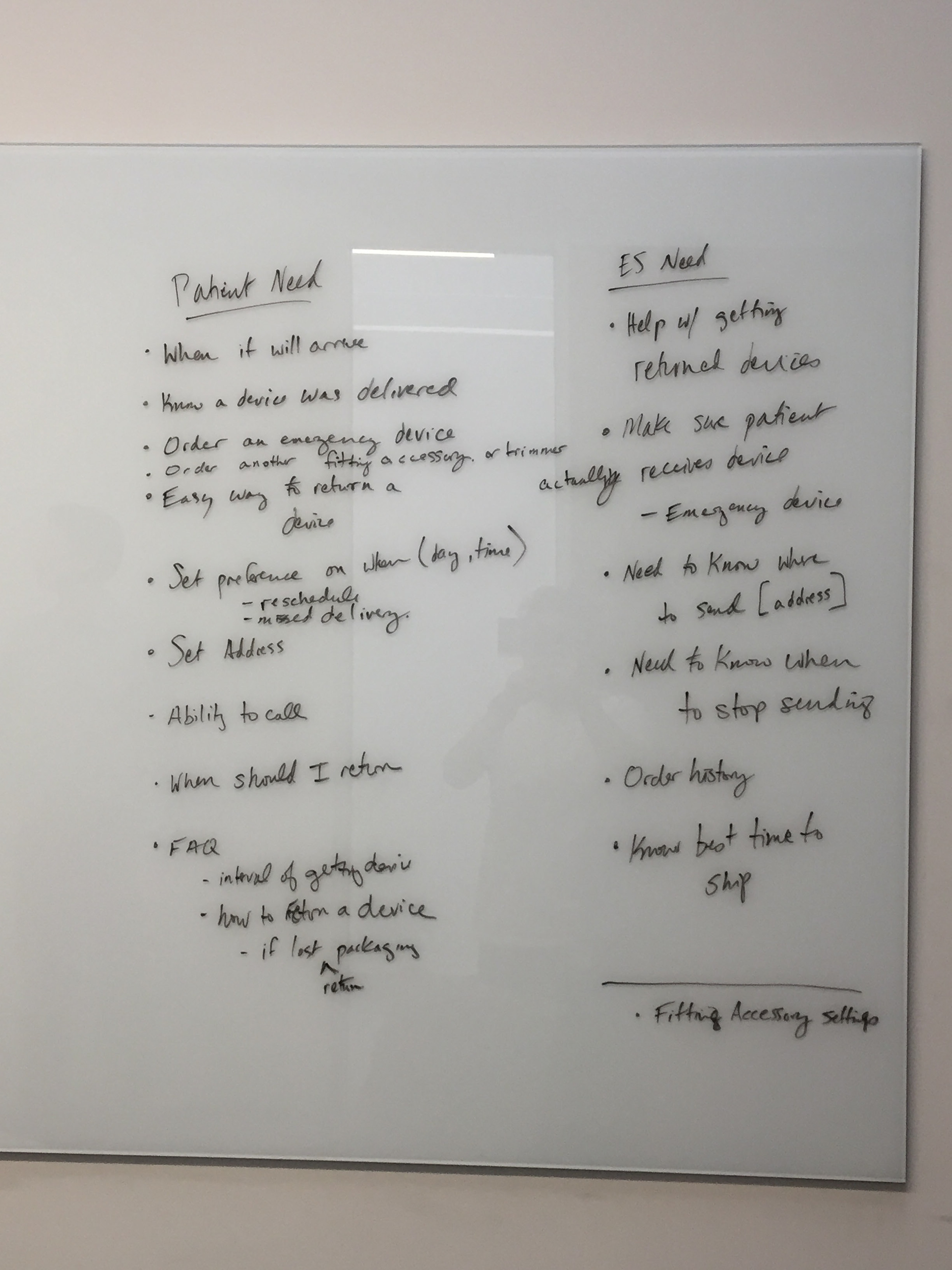
Some notes from our brainstorming session.
In general the Logistics Feature should accomplish these tasks:
1. Status of Delivery
2. Easy way to place an emergency order
3. Easy way to return a device
4. Way to Contact Customer Service.
5. FAQs regarding deliveries and returns.
We also garnered the following insights from this brainstorming session.:
1. User's personal details such as delivery address and preferred delivery times would be set up through a sales rep.
2. A user can only change his or her details by contacting customer service due to security reasons.
3. Users will contact customer care when they place emergency orders for items.
4. Patients need to contact customer care when changing details of an order or when a delivery has been missed.
Personas
The next step in understanding how to implement the design of the Logistics feature was to empathize with our users. To better empathize with our users, we created a provisional persona to understand who will be using the Logistics feature.

In doing a provisional persona we gained better insight of what kind of processes users enjoy when it comes to tracking their orders as well as ordering and returning items. We discovered with an older user base designing something with familiarity is better than designing something revolutionary. This led us to seek after delivery processes from well known delivery systems such as Amazon and FedEx.
Competitive Analysis
In building with familiarity in mind, it was best to analyze how giants such as UPS, USPS, FedEx and Amazon create a good user experience for their users. Using their designs as a basis for ours was a great template for us to start our design.
Key insights we focused on is understanding how Amazon makes ordering items simple and how USPS, UPS and FedEx handles pickup orders and tracking.



Ideation
User Flows
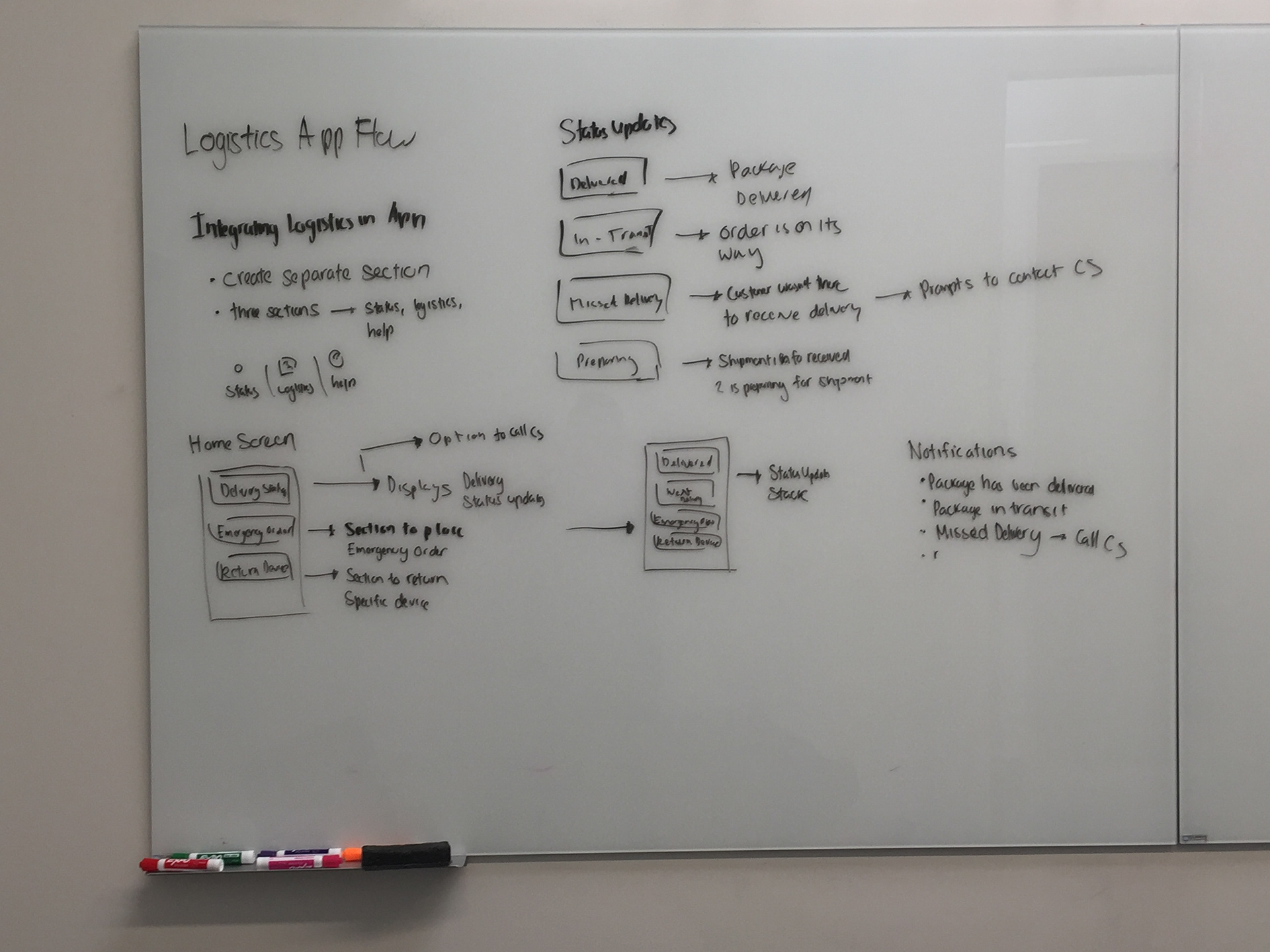
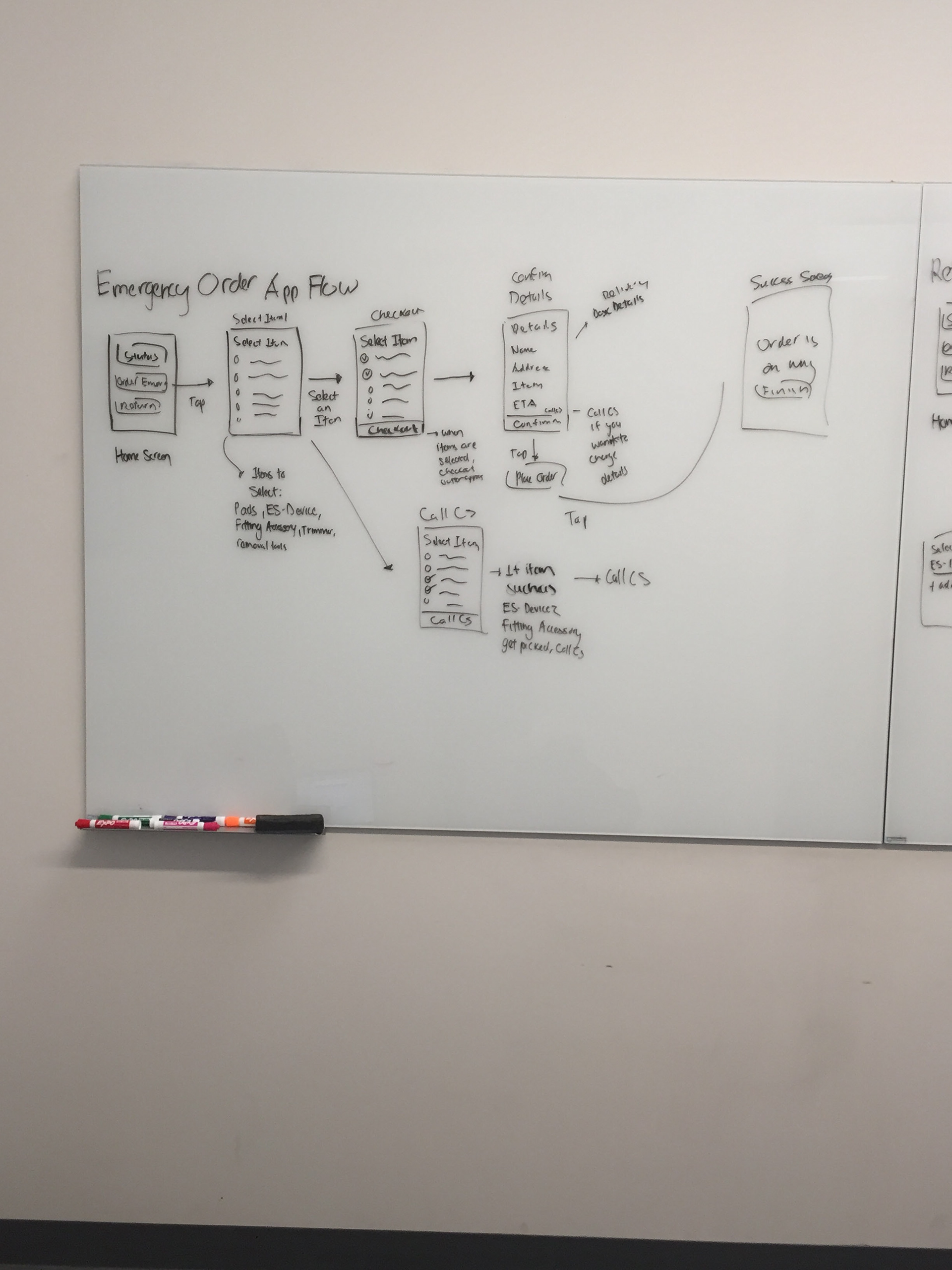
The first step we took towards ideating our design was designing the user flows. These user flows were based on the typical flow of how a user would deal with tasks such as placing an emergency order, returning a device, contacting customer service and tracking an order.
Designing these flows required two iterations. Doing these flows helped map out our process and user experience. Additionally, it helped us identify edge cases as well.


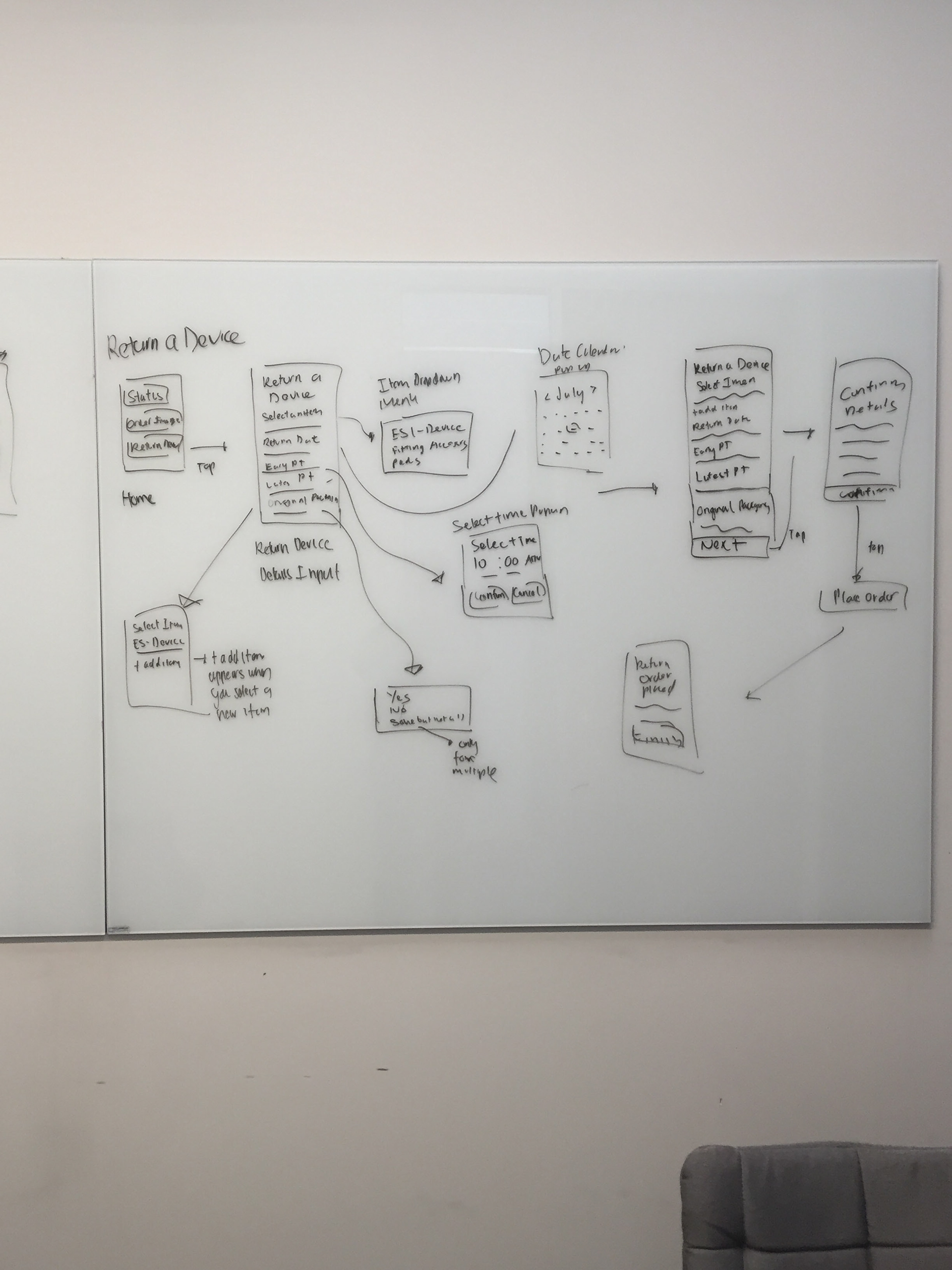
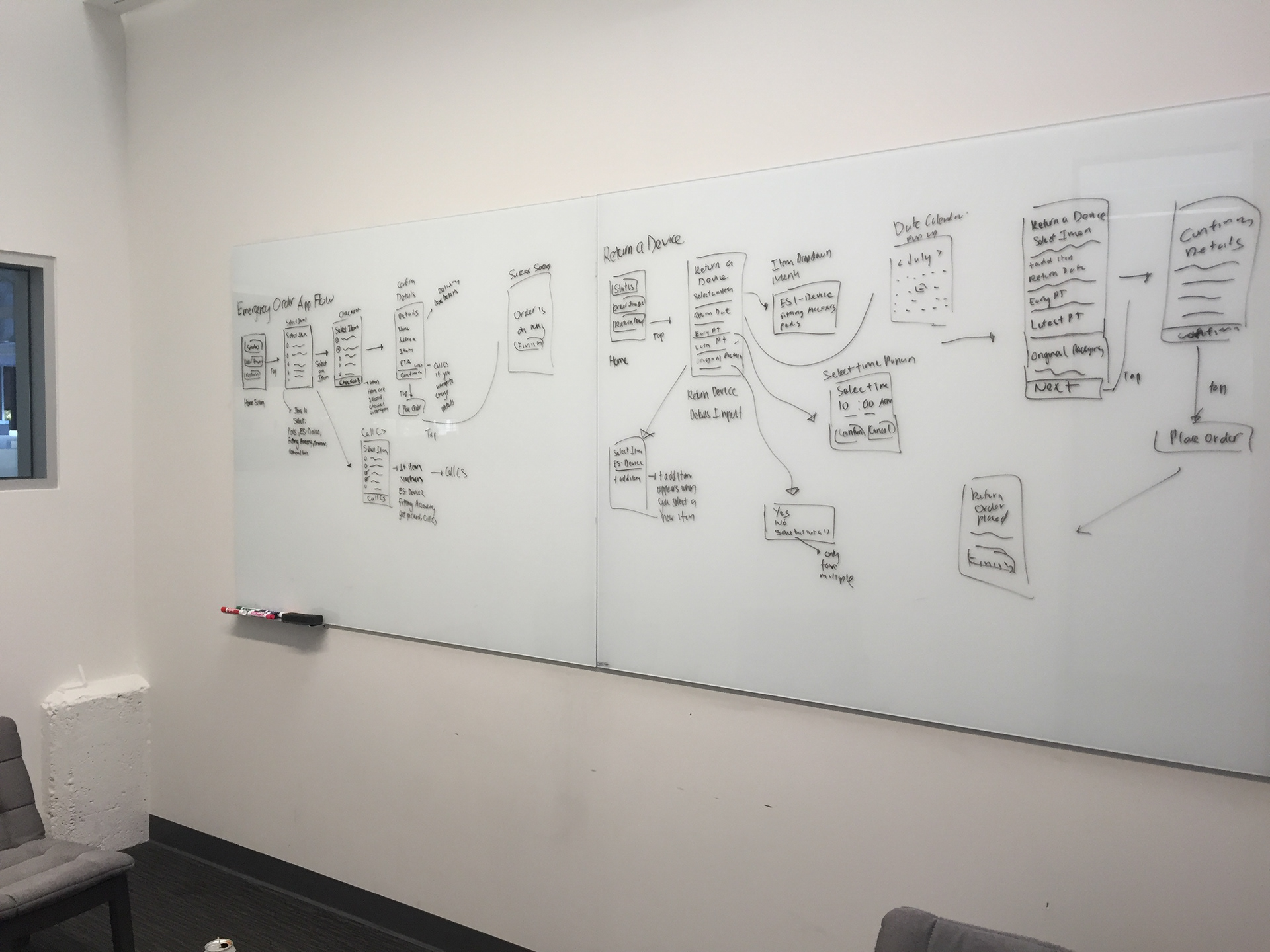
Whiteboarding
Our whiteboarding session mainly focused on designing the UI skeleton. We translated all our research and user flows into rough sketches of what our wireframes would look like. This helped us not only visualize our user experience but also gave us an indication of what our user flows would look like in terms of the app design.
Prototyping
In the prototyping phase, we translated the designs from our whiteboarding session into a higher fidelity using Sketch. We then used the prototyping app Flinto to animate our designs for user testing.

Home Screen & Home Screen Status's

Emergency Order

Returning a Device
Testing
We ran our user tests for the Logistics Feature in conjunction with our user testing session for our Timer Feature. In these user testing sessions, we had 7 users who were all around the age of our target user. For these tests, we prepared a number of tasks for each user to complete in order to test usability. Additionally we also prepared a series of questions to analyze a user's thought process and opinions.
The main goal for our user testing sessions was to evaluate the overall usability of the Logistics feature and gain insight to what improvements we can make overall.
The success criteria for our user testing, would be the successful completion of all tasks with little to no usability issues and good feedback.
As a result of our user testing, we were able to identify that all users were able to find the ability to return and order items as well as track orders to be pretty simple. They considered it similar to Amazon and UPS processes. Overall feedback was good but we did identify a couple paint points.
These pain points include:
1. Slightly small text.
2. Confusion on setting latest pickup time and earliest pickup time in Return a Device Section ( Users took a while to notice keypad popup when setting time.)
3. Confusing Wording
4. In Emergency Device Order, some users expected to go to another screen when tapping on confirm. ( Currently after tapping confirm, the button changes into checkout).
Furthermore, one last insight we received that was quite interesting was that one user said despite how usable you make it “my mom will always have trouble with these app things, she’s just scared of technology. She much rather talk to a real person than deal with something digital.” This insight shows us no matter how much this section may help our users, there are some users who may find this much more of a hassle than good.
Iteration
For the next iteration of the Logistics feature, we translated our wireframes into a higher fidelity while improving upon the usability issues we discovered during user testing.

Home Screen & Home Screen Status's

Emergency Order

Return a Device
Conclusion
Next Steps
Since the Logistics feature is still a developing concept, the next steps for this design is to continually research, test and iterate till we refine the perfect user experience. Additionally, the name of the section needs to be refined to more reflect the action it lets you complete.
Retrospective
Overall this was a good project for me because in enabled me to see a future increase in functionality of the companion app as the device reaches commercialization. The project itself was interesting as I was able to design a feature from scratch and leverage existing delivery design systems. Though I would've liked to get in another user testing session to see what further I can improve on.
Lessons Learned
From doing this project, I learned the following lessons:
1. It's better to leverage off existing platforms and use familiar conventions users know then to make something completely new.
2. Sometimes no matter how usable something is, some users might have a harder time using it because they fear technology.