Overview
This project was completed during my time as the Lead UX/UI designer at Awayco. Awayco is a subscription based service that disrupts the rental industry by providing the latest in extreme sports equipment anywhere, anytime. My project was associated with Awayco’s web app.
In redesigning the search feature I aimed to not only alleviate user pain points in finding products to reserve but we took a step forward into taking our product into multi -vertical.
My Role:
UX/UI designer, UX Researcher
Project Length:
4 months
Collaborators:
VP of UX, CEO, CTO, VP of Growth, Front End Engineer, Retail Manager, Community Manager, Snow, STRV Development Agency
Tools Used:
Sketch App, Invision App, UserTesting.com
Methods Used:
User Interviews, Product Analysis, A/B Testing, User Testing, User Flows, Personas, Wireframing
Our Goal
This was a large redesign that had multiple goals. They consisted of:
1. Increasing search functionality
2. Improving browsing experience
3.Optimizing product discovery and find-ability,
4. Switching from single vertical search to multi-vertical search and product categories.
Our overarching goal was to complete these milestones to reduce user churn and increase user adoption.
What are we trying to solve?
The search functionality of the user app was limited and restricted. Users were not allowed to freely browse or filter for what they desired. They had to follow certain parameters to actually find what they wanted. This in turn caused much user frustration.
There are countless encounters where I would see users either call or come into our HQ in order to receive assistance in finding their desired product or making a reservation.
Our Solution
In order to address this problem, I chose to redesign the whole search functionality. I chose to redesign search in order to promote user freedom in product discovery as well improve reservation rates by making our products easily searchable.

My Process
I followed a process that consisted of 4 key phases: Research, Ideation, Testing and Iteration.
Research
I had two main goals for our research study. First I wanted to understand what our user pain points were and how to address them. And second we wanted to understand how I can adapt this new search feature into the multi-vertical.
Analyzing the Current Platform
When It came to search, the main problem was that the online experience was not reflective of the in-store experience. Users were barred from freely browsing. Users often described their in store experience as being a kid at a candy store but unfortunately the online experience did not reciprocate that.

Informal Conversations
The cool thing about working at Awayco HQ is the company side is next to the Retail Side. The benefit of this was that I was able to do informal user interviews quite frequently.

From these informal user interviews, I was able to learn the following things:
1. Users found search limited in which they were unable to look for products using filters.
2. Users were unable to browse the inventory of specific shops.
3. Availability of boards was inaccurate and hard to determine.
4. User’s were not able to quickly find a board around or nearby them.
User Feedback
What’s great about Awayco’s user base is that they are often vocal about their feedback. We often received emails detailing user pain points and suggestions to further improve our app. Additionally we also received emails detailing why users are leaving our service.
Here's an example:

Verifying with the Experts
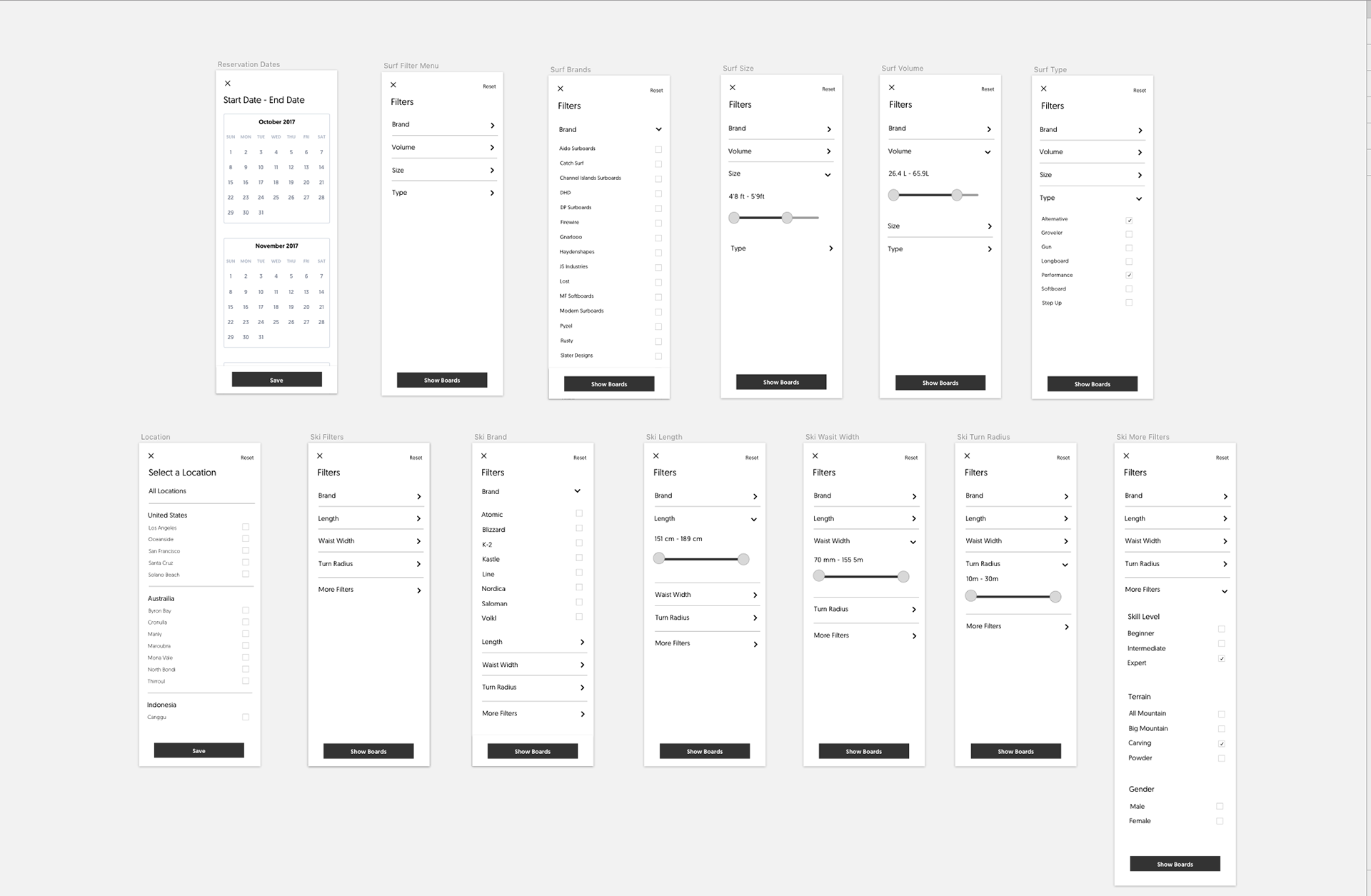
In talking with our VP of Growth and our Retail Manager who were avid surfers themselves, I was able to confirm that the desired filters for surf would be dates, brand, volume, size and type. On the other hand for Ski’s, in talking with our snow lead, it was a little more difficult as there were many ways to go about searching for the right skis. We were eventually able to narrow it down to be dates, brand, waist width, terrain, ski length, turn radius and gender.
Personas
I created provisional personas based upon levels of ability in accordance to the existing product, surf. For each level of ability, I tried to understand what features of search would be great to implement for each experience level.


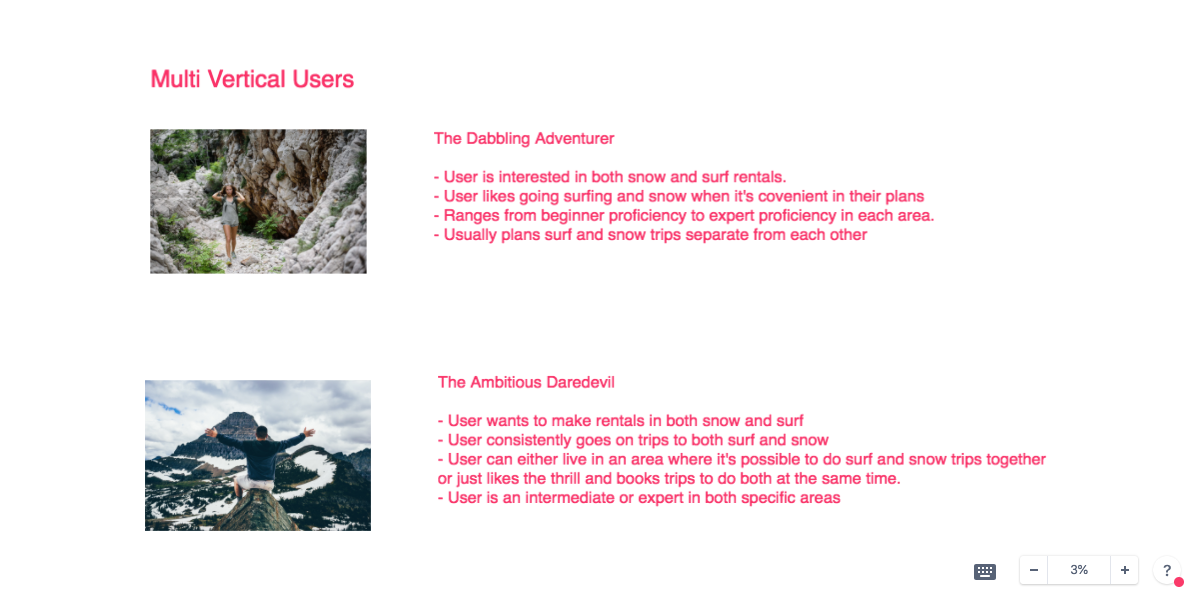
Now for expanding into multi-vertical, I created another set of personas that framed our users between single vertical users and multi-vertical users. I did this to fully understand how expanding to a multi-vertical platform will affect the usage of our product.

Feature Analysis
The next step in my research journey was to analyze existing platforms with great search systems as well platforms that specialized in surf and snow products. I did this in order to learn how to properly design our search for multi-vertical. This allowed us to leverage off existing platforms to recreate our search functionality.
In this analysis, we looked at platforms such as Airbnb, Amazon, Google, BackCountry and many more..


Ideation
Exploring UI
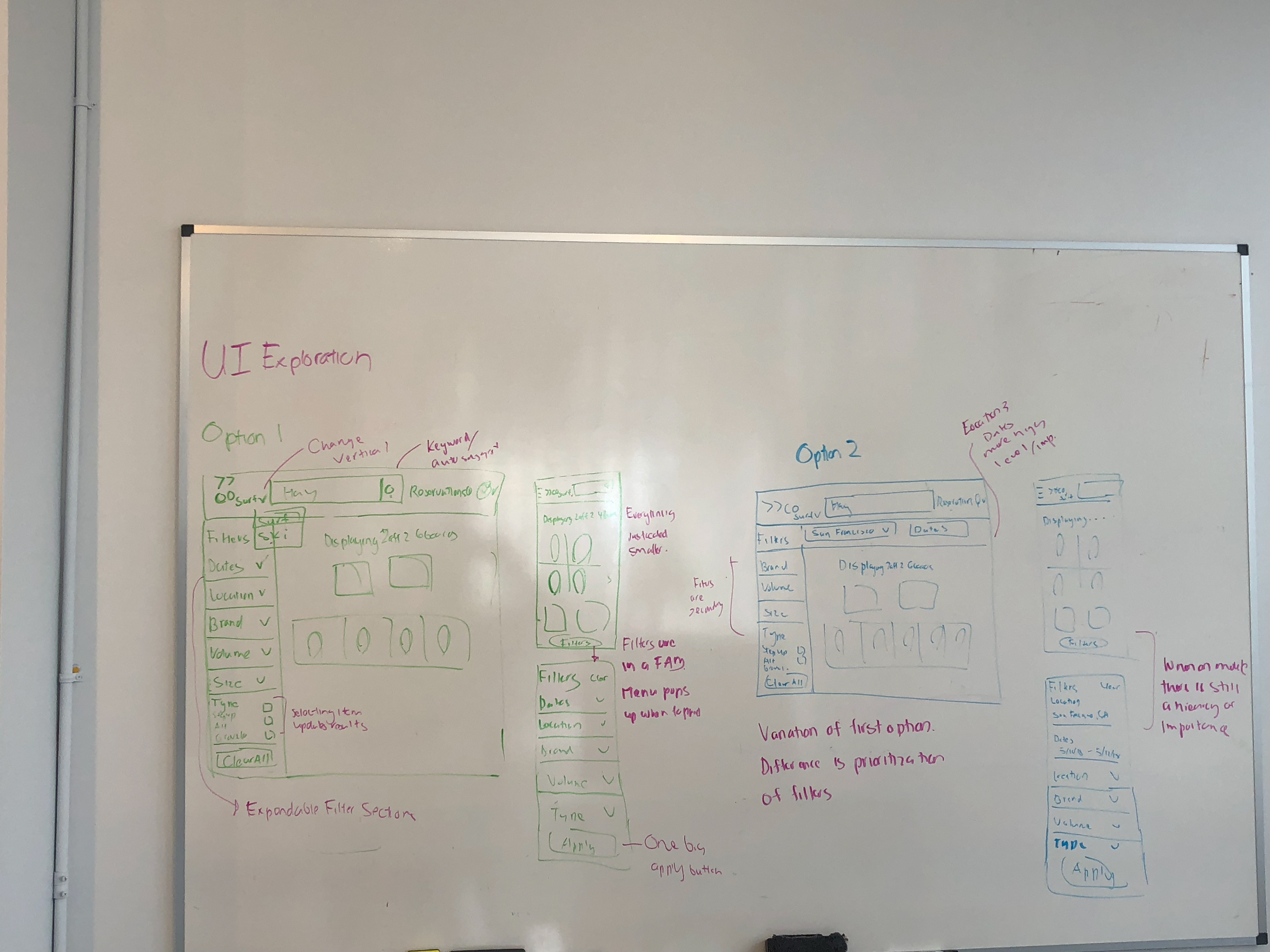
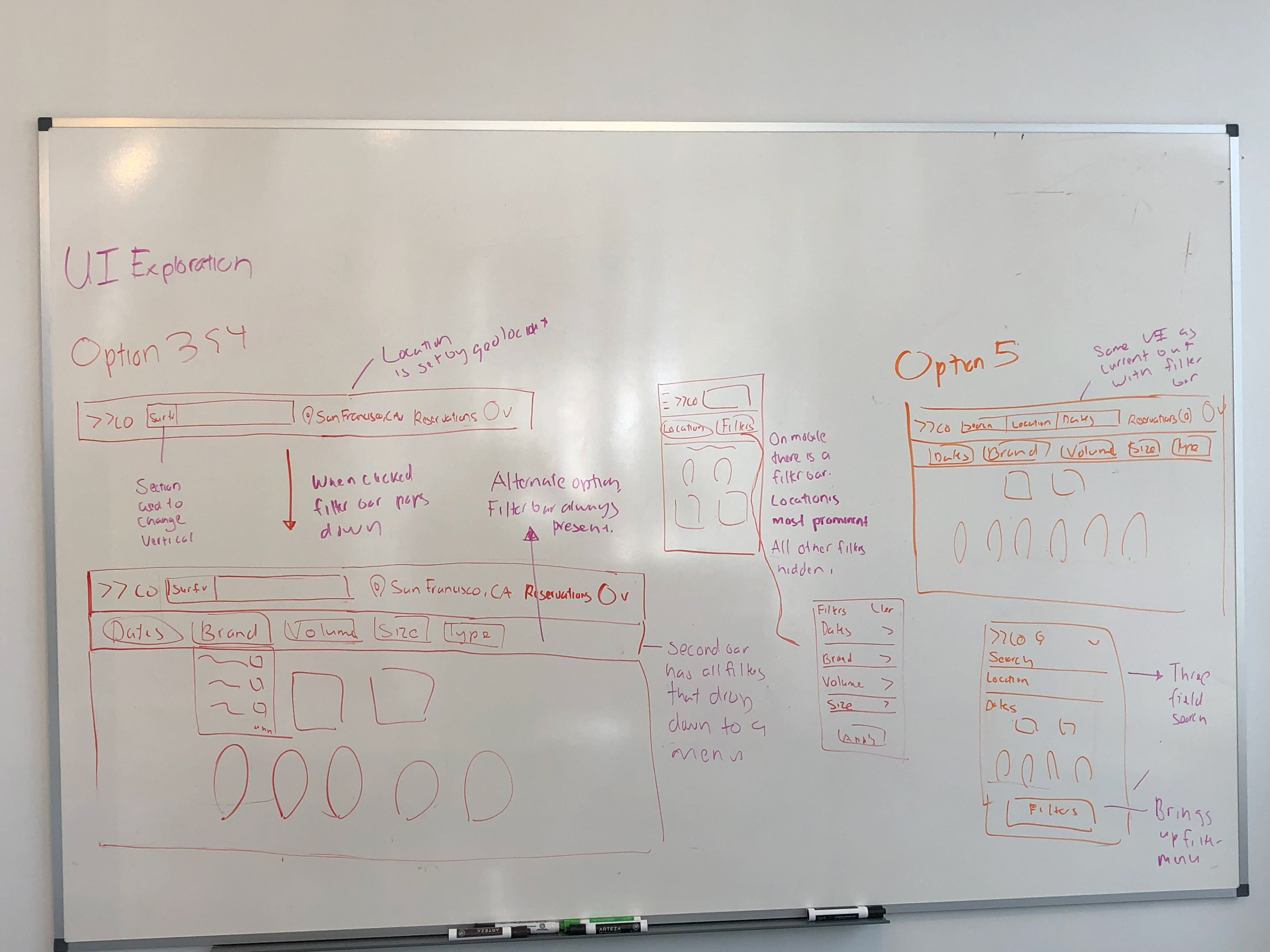
In exploring different UI iterations, we decided to further explore two options. These two options include a version where the filter bar is only present when a search query is made. The second version has the filter bar always present within the search bar.
Sketching
After establishing what direction we wanted to go with our UI, I mapped out further details of our solution by sketching out the different interactions a user would go through in using our platform

Wireframing
After sketching, I translated my drawings into low fidelity mocks in Sketch.

Home pages of different verticals

Search Option 1 (Filter bar present only after query submitted)
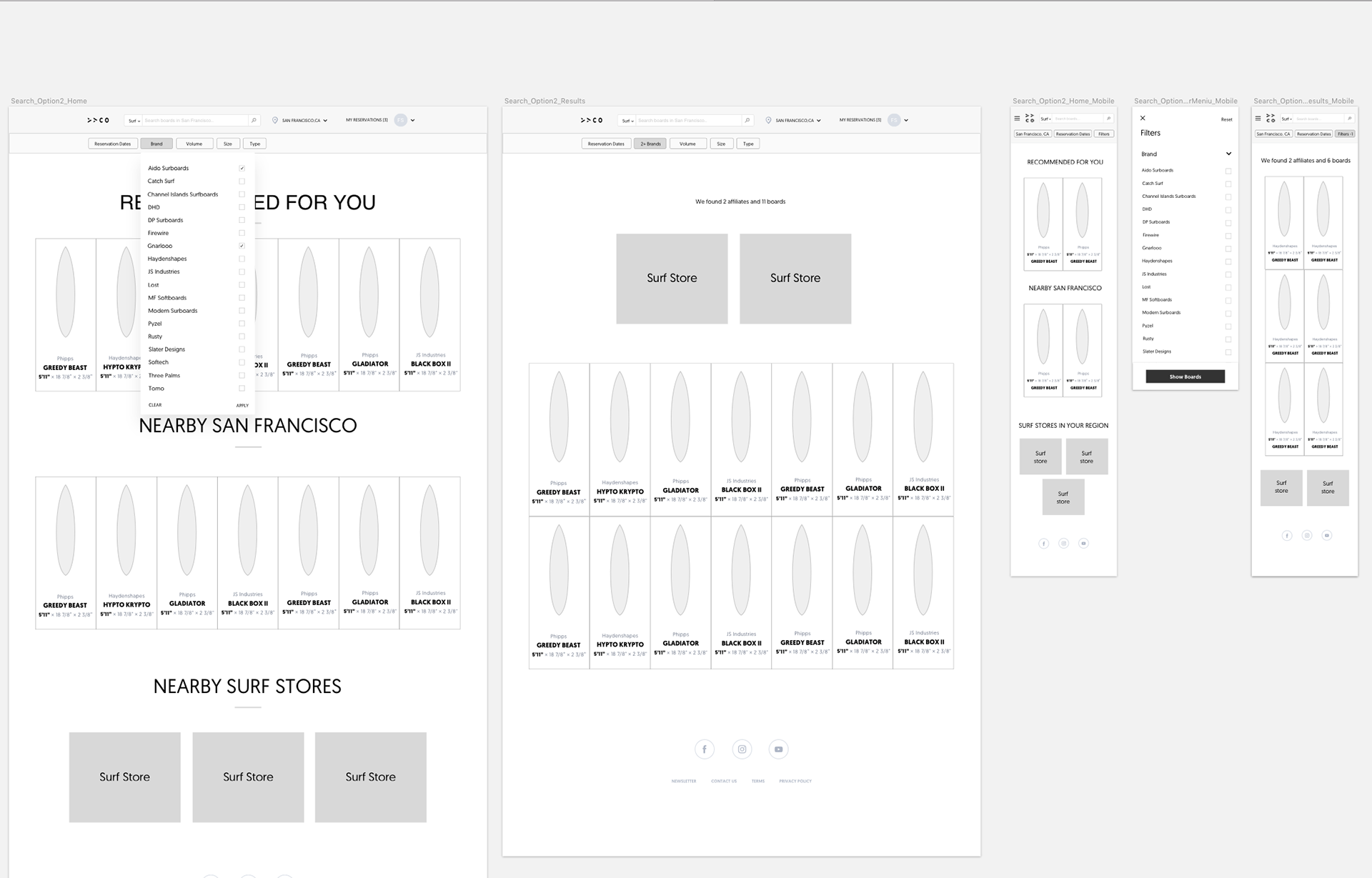
Search Option 2 (Filter bar present always)

Testing
Criteria
We wanted to A/B test our two versions of search in order to explore how users would utilize the new search functionality. The main questions we wanted to address during this user testing session were:
1. Are users able to switch verticals successfully?
2. Are users able to search by a specified filter?
3. Would users plan to reserve ski’s and surfboards at the same time or separately for a trip?
4. Would users prefer having the filter bar always present to browse or just present when a query is submitted?
5. Are both versions of search usable?
6. How can we further improve search for our users?
I carried out our user testing through Invision. I tested it with a sample size of 10 users at the Awayco store as well as 5 additional users through usertesting.com. I observed users complete a designated number of tasks and obtained their feedback at the end.

Results
From our user testing sessions, we gained the following insights:
1. Users would only search ski’s and surfboards individually as opposed to both at the same time.
2. Awayco users loved the new filter system, and preferred our new prototype in comparison to the current search system.
3. New users found the filter system to be familiar and usable.
4. Users liked the explore Awayco page.
5. Users preferred to have the filter bar always present as it was hard to find when it was hidden.
6. Users were able to successfully change verticals but some preferred it to be more prominent.
Suggestions that we received:
1. Having a section on the homepages to quickly rebook surfboards or ski’s you have previously reserved.
2. Having recommended boards/ski’s to specific preferences.
3. Having some sort of indication or filter to designate which boards or ski’s are available.
4. Having saved search sessions.
Iteration
Taking the data we collected from user testing, me and my superiors made the decision to pursue the search variant where the filter bar was always present. Not only was this decision the user favorite but it focused on the main goals we were trying to achieve. This version of search allowed users to freely browse and explore as well find their desired product as quick as possible. In the next iteration of search we focused on these priorities.
A majority of this iteration of search is pushed live at Awayco.com.
Revamping the Search Bar
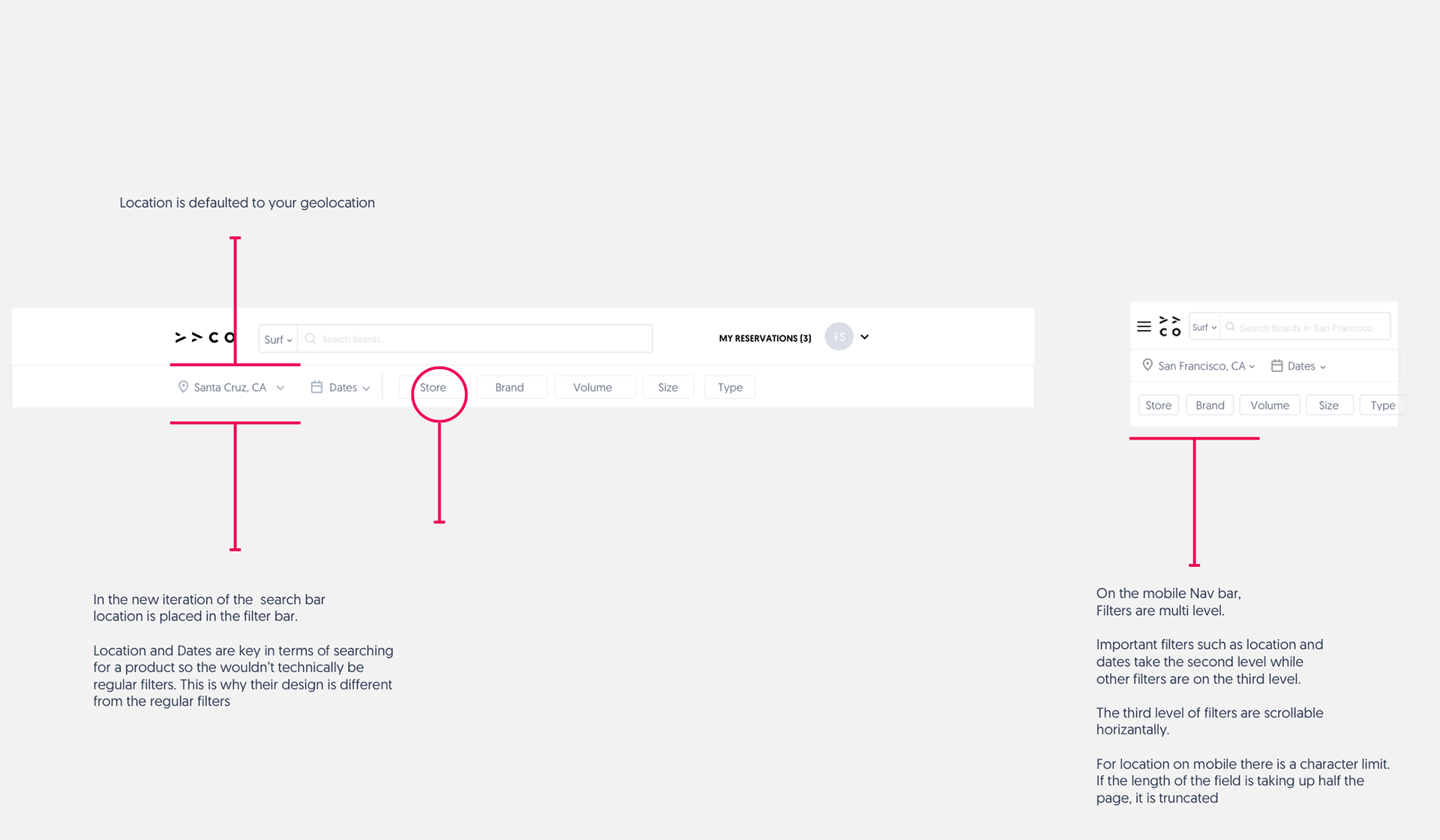
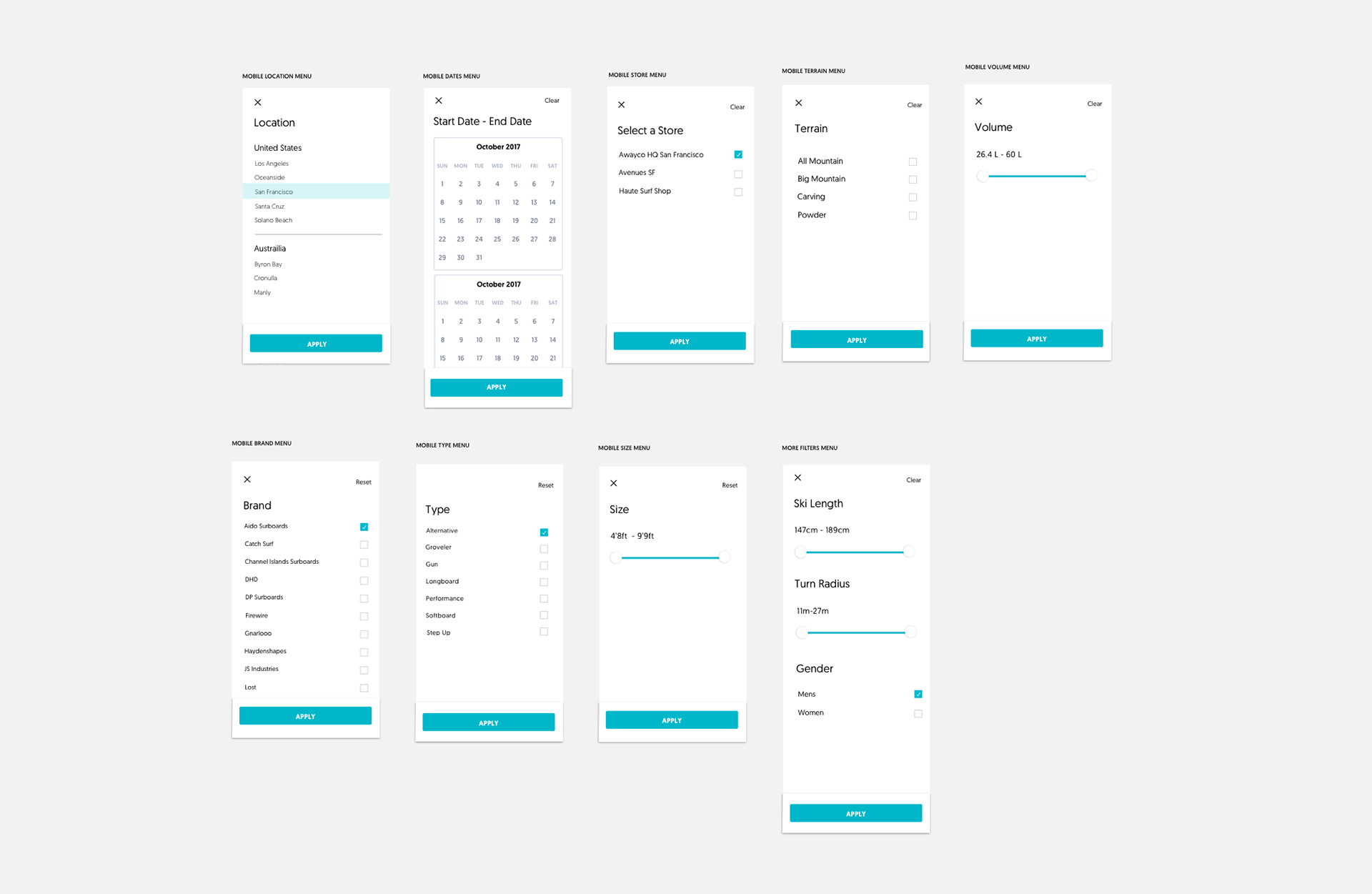
Post user testing, I spent time revising and adding things to the UI. In discussing the direction we wanted to go in, we wanted to focus on prioritizing the search and optimizing it for mobile. This lead to a different variation of what we previously had. The desktop version now has location serve as a primary filter in conjunction with dates. The mobile version has been completely revamped, having all the filters present instead of hidden under a filter menu. These filters also have their own individual corresponding menus as well. Furthermore, a store filter was added to help parse products by specific affiliates in the area.
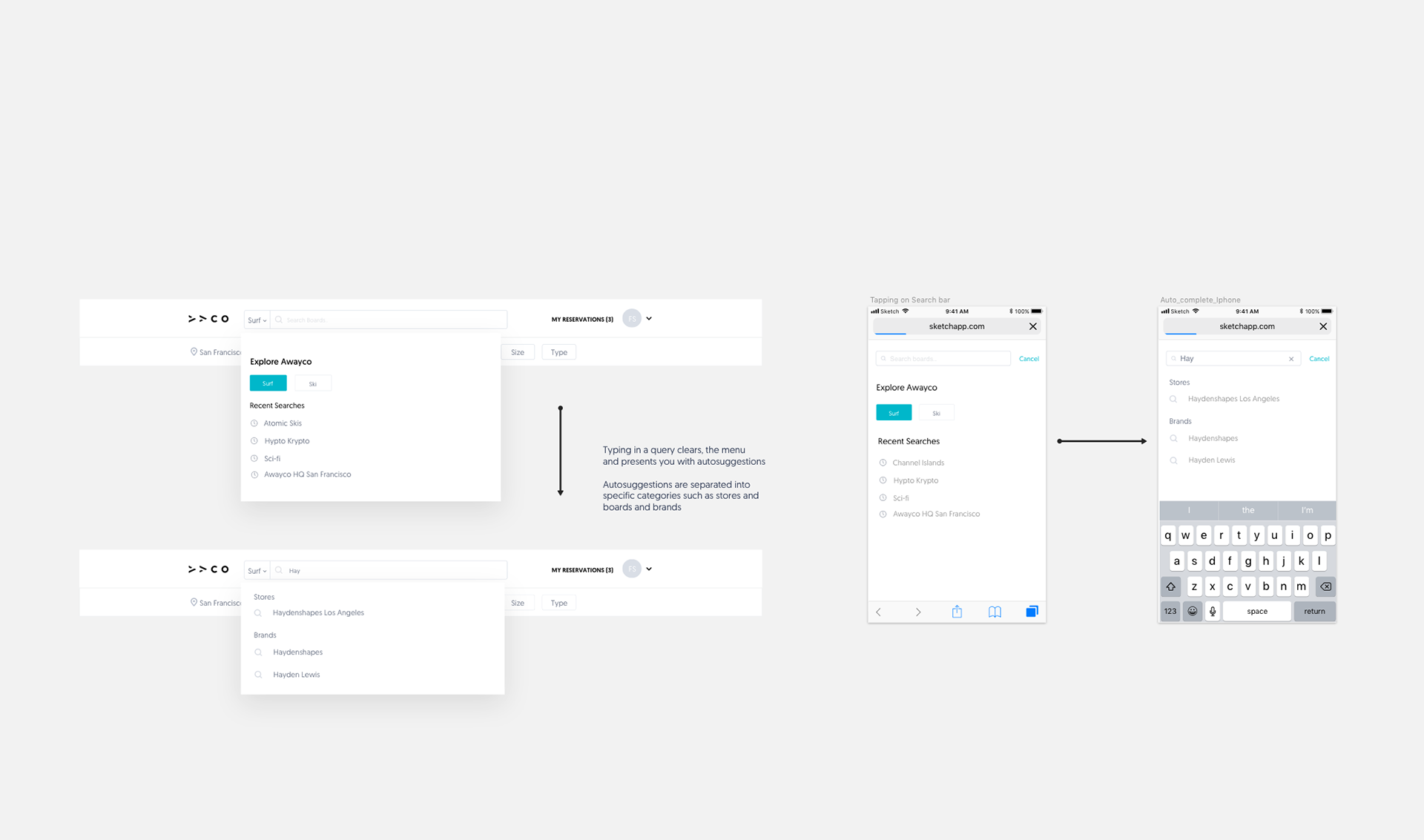
Also every time you make a search, you will now be presented the ability to change your vertical and access your most recent searches. Searches are now focused more on text based query and autosuggestion.
Search Bar Default State

Search Bar Active State
Search bar Active State (Query Typed)

Desktop Filters
Mobile Filters
Improving Visibility and Discovery
Aside from revamping the whole search bar, I also wanted to improve discoverability of our products. This included putting volume and waist width values on product tiles as well as including which store in your location a certain product is located at. I also wanted to allow users to see when a board or ski would be most readily available, so we put the first available date on each product tile.
In terms of vertical home pages, we wanted to help users book their favorite boards faster and discover new boards. For now we included a section where users can rebook past reservations and a section where users can see nearby boards in their area, Furthermore, by clicking on affiliate tiles, users can browse and filter the inventory of individual stores.

Vertical Home Pages on both Desktop and Mobile

Product Tiles with Volume,Waist Width, Location and Date Availability

New Affiliate Pages with Store Inventory
Feedback
Though we weren’t able to conduct another round of user testing, we received a lot of feedback from pushing the new search. Many users who have come to pick up boards at Awayco HQ have been thrilled with the new search.
They couldn’t believe how fast and easy it was to find their desired product to reserve. Other users didn’t realize they were using a totally revamped search as they were able to jump into using the new search with no struggle. Overall our user base considered the new search a vast upgrade over the previous iteration.
Interesting feedback we received:
1. Search is a function of location. There should be equal visual parity between both.
2. Search on mobile and search on desktop feel like different experiences. Search on mobile is focusing on finding specific items while desktop is about discovery.
3. Users use the Awayco platform in different ways and thus view the UI differently.
Impact
With all the new features we launched, users were thrilled and excited. Not only were we able to improve our experience, were able to launch a new product vertical, Snow. We had the following impact:
1. 50% increase in user retention
2. 32% increase in total number of users.
3. 25% increase in total number of reservations
Conclusion
Next Steps
The next step for this project is to release the features that were left out from the previous sprint. After implementation, it would be great to spend some time to gather feedback from users. This will help us improve for the next iteration.
Retrospective
Looking back at the whole design to development process, it would have been better if we broke up search in to smaller feature launches instead of putting all of our eggs in one basket. I felt like it would’ve provided more insightful data and allow us to iterate faster.
There are many instances where I felt like we could’ve explored more or tackled a situation in a better way. But given the size of my team and other surrounding circumstances, I’m proud of what we released and I am receiving positive feedback for what I have done. It was definitely a great experience in which I got to wear a lot of hats.
What did I learn?
Search in any standard is a complex feature to tackle. Though there are many instances of good search design, learning how to adapt it to your specific platform is a large task. I honestly thought it would be quite simple but I realized such a simple feature has many things associated with it. Additionally, many users use search differently. This is where data driven design is important in regards to making decisions. Working with a small team and working with others around the world, I learned communication is the utmost importance when it comes to launching a successful product and maintaining internal peace.


