Overview
This project was completed during the course of my internship at Element Science. Element Science is a medical device company that aims to prevent Sudden Cardiac Death with their Wearable Cardioverter Defibrillator.
My project was associated with the companion app to their device. The timer feature will help aid the device application process.
My Role:
UX/UI Designer, UX Researcher
Collaborators:
Product Manager, Clinical Team, Marketing and Business Operations Lead, Industrial Design and UX Lead
Project Length:
2 months
Tools Used:
Sketch App, Invision, Flinto
Methods Used:
Interviews, Observation Sessions, Personas, User Flows, Wireframing, Prototyping, A/B Testing, User Testing.
Our Goal
We had three main goals:
1. Decrease distraction and increase user focus
2. Make device application process easier and more convenient,
3. Make the digital manual for the device more interactive.
These goals will help aid the user properly and easily apply their ES-1 device.

What are we trying to solve?
During the application process, the user must often complete a task for 30 seconds. This process is currently done using a paper manual in conjunction with an external timer, and the process proves to be inconvenient to users as they have to divert their focus to multiple areas instead of focusing on a singular action in a delicate process.
Our Solution
To solve this problem, we want to create a digital timer to help the user focus on the tasks at hand and provide a more convenient way to apply the wearable device.
My Process
I followed a design process consisting of 4 key phases: Research, Ideation, Testing and Iteration.
Research
Interviews
In order to better understand how the timer was going to be used, I had to understand the process associated with the paper manual . I met with the manual's designer in order to talk through the application and removal process of the device and how designing a timer will help.
From our conversation, I was able to gain the following insights:
1. The timer would prove to be useful in three distinct sections: Skin Preparation, Fitting the Device and Device Application.
2. Within Skin Preparations, the user had to clean three distinct areas for 30 seconds each.
3. For the Device Fitting, the user would have to press on 3 distinct areas for 30 seconds each in order to help place the device on them.
4. For the Device Application process, you have to press and hold on certain areas of the device for 30 seconds each to securely adhere the device to your body.
Observation Sessions
The next step in my research journey was to see how the steps in the paper manual translated into action. In order to observe this, I shadowed a couple studies to view the device application and removal process.
From shadowing these sessions I was able to gain the following insights:
1. 30 seconds can be a long time to complete a task in comparison to one’s expectations.
2. Users can easily get distracted from the task at hand without something or someone keeping them on track.
3. It's inconvenient to keep looking between two separate objects such as the paper manual and an external timer amidst complex steps.
Personas


After understanding, where the timer would be implemented, our next goal was to understand the users of our timer. In order to empathize with our user base , I created two personas to better our understanding of who will be using the timer. Our personas are based upon the typical user of the device which consisted of a male or female with heart problems within the age range of 40-70 years old.
In creating personas we gained the following insights:
1. Users want the device application process to be as easy and seamless as possible to complete.
2. Users don't want to be rushed but understand there's a time limit to abide by.
3. Our feature should be designed to cater to an older generation who might not be as tech savvy as today’s generation.
4. We acknowledge that a digital timer paired with the manual in a app would be very convenient and great for our user base but for some it might be more of a hassle and a huge learning curve.
Ideation
White boarding
To facilitate possible solutions, me and my Product Manager set up a white boarding session to crank out some ideas of how to design this timer. For this first iteration we focused on creating one universal timer that can be implemented in either the skin preparation process, the device fitting or the device application.
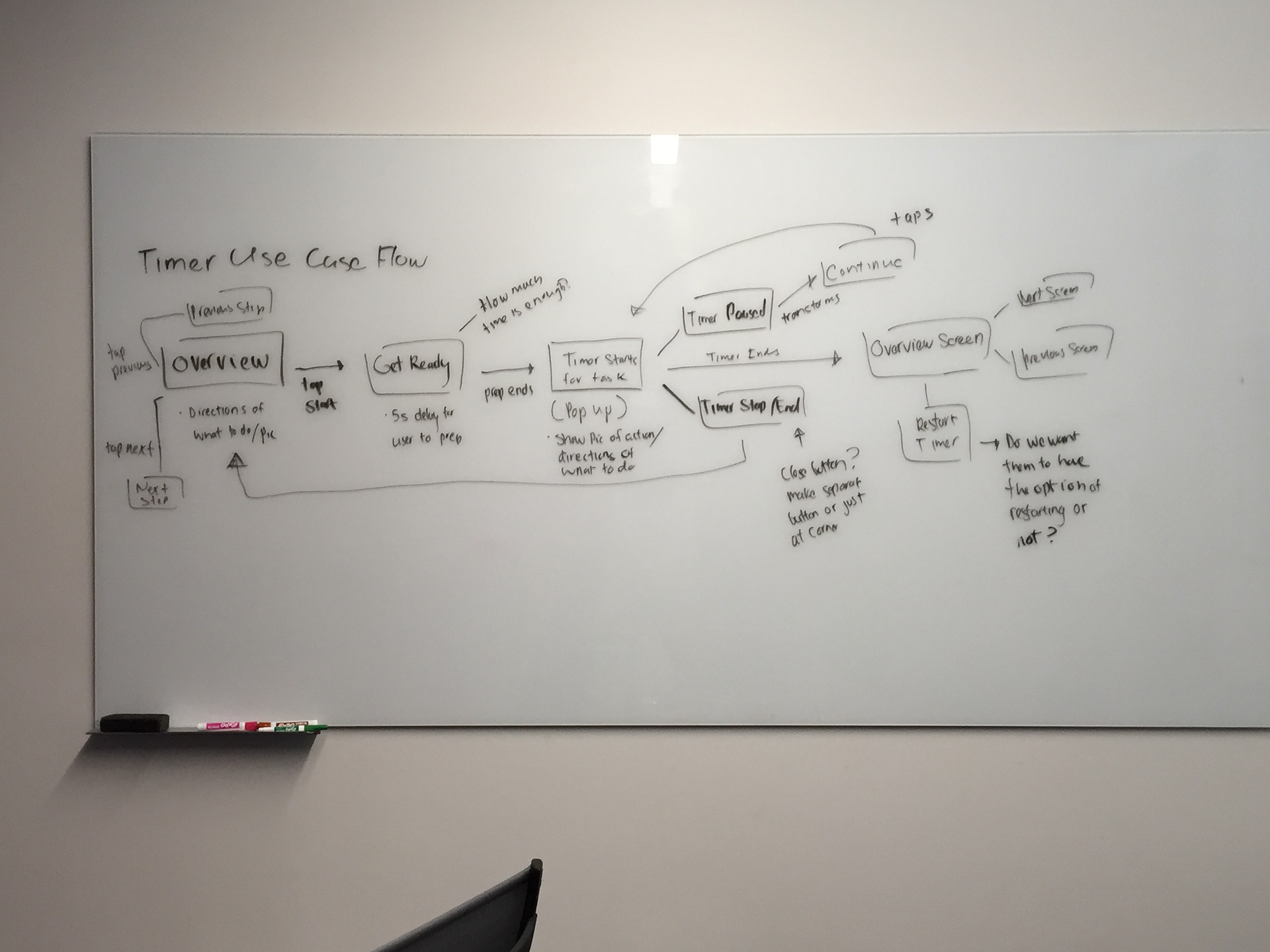
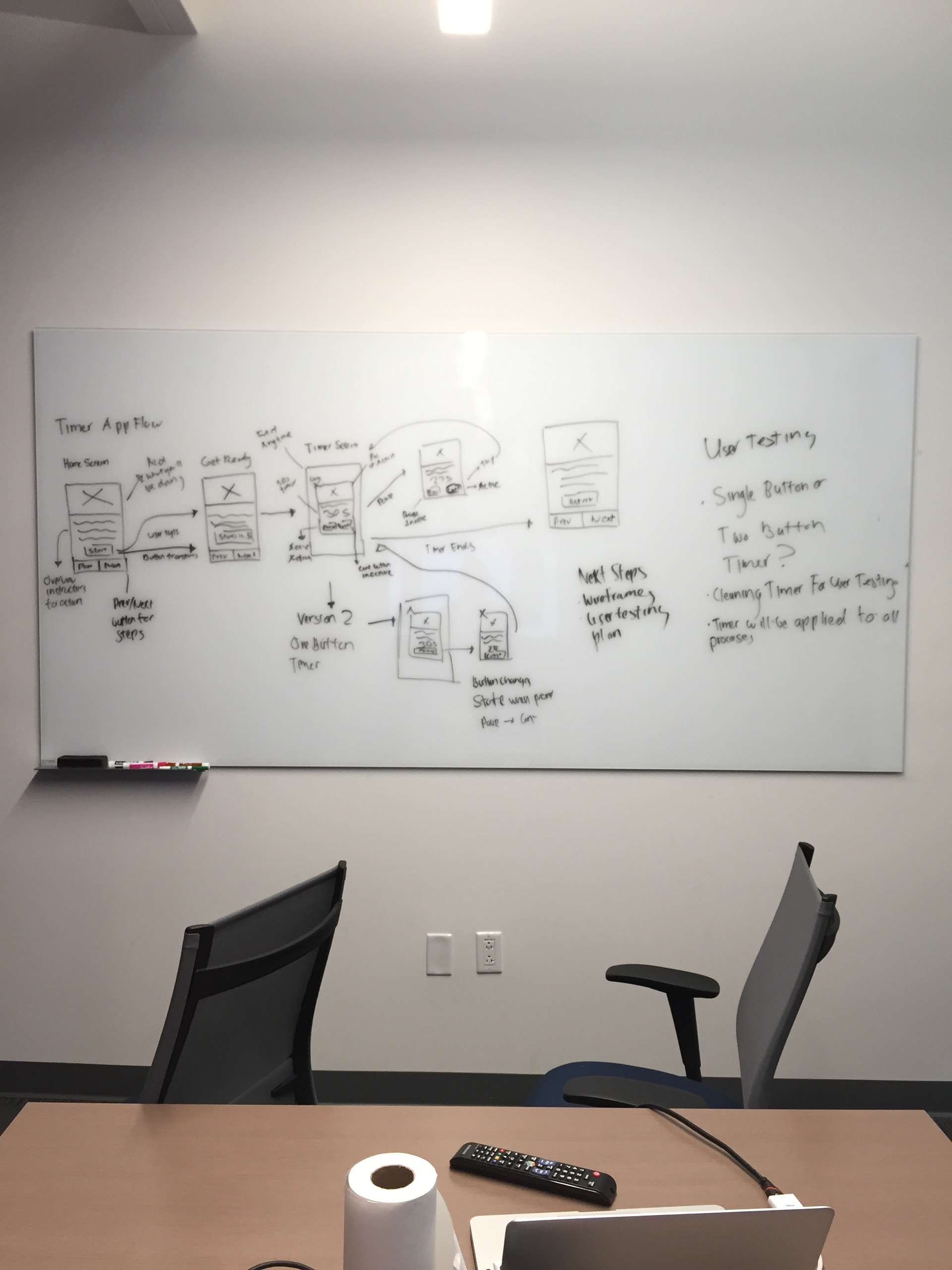
In our white boarding session we focused on insights from our research to fuel our design. I concentrated on translating the paper manual steps with the 30 second actions seamlessly into a mobile experience. I wanted the process with the timer to be easy to understand as well easy to complete.
As a result of the session we created two versions of the timer to test. These two versions consisted of a single button timer and a two button timer.
The two versions are pretty similar in which they both start off with an overview of what action/task they will be completing. Then after pressing on the start button, you will be given a 5 second buffer to situate yourself before the timer begins. Once the timer starts, you’ll have 30 seconds to complete the task on screen. Though you have the option to pause and close the timer if needed.
Prototyping
Using our whiteboard sessions as a basis, I translated the conceptual designs from the whiteboard into a clickable prototype using Sketch and Invision.

Two Button Timer
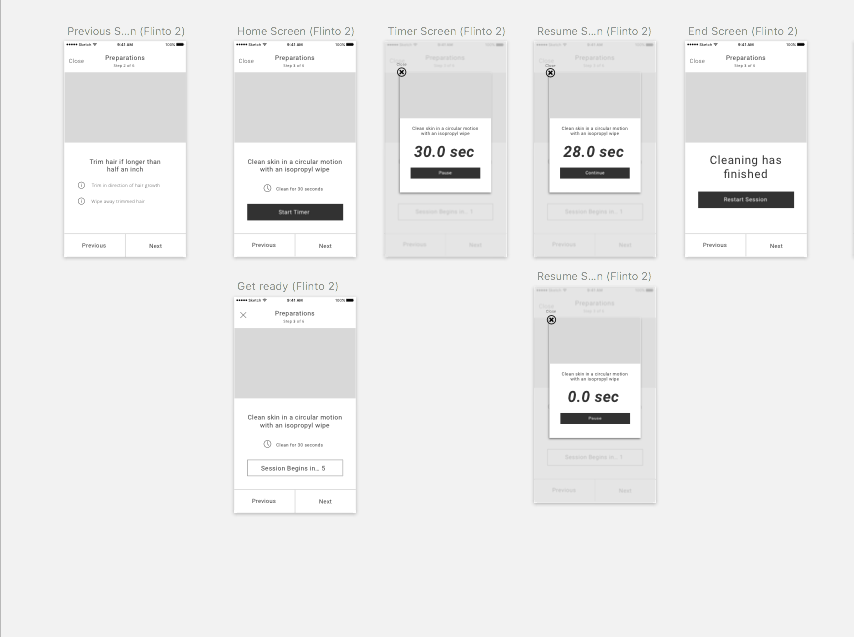
One Button Timer
Testing
With our Invision prototype, the Product Manager and I tested our timer with a total of 5 users. Our timer tests were a part of a larger testing session that we did which included testing other concepts.
The way we conducted user testing is that we prepared a set number of tasks for the user to do and asked them to complete each task to the best of their ability. Our overall goal for this session was to gain feedback on usability as well as preference between the one button timer and two button timer.
Our success criteria was dependent upon the overall usability of the timer. If the user was able to successfully complete each task without tremendous difficulty then that session was a success.
Results
As a result of our user testing, we discovered users had no trouble using our prototype and considered it a useful aid to applying the device. Additionally, 4/5 of our testers preferred using the one button timer as it was a much easier and simpler experience.
From our test results we decided upon going forward with the design of the one button timer.
Iteration
Back to the Drawing Board
Despite our user testing session being a success, we thought we were all good to move onto translating the one button timer to a higher fidelity prototype. Unfortunately, we were met with a predicament.
In meeting with the clinical team, we discovered steps in the paper manual have been revised. The main change had to deal with the cleaning process.
The cleaning process would require the user to use alcohol soaked gloves for cleaning as opposed to wipes. This is important because the user will have to use both hands instead of one for the skin preparation process. In order to accommodate this change we would have to include a longer buffer time for the user to put on the gloves and thus move on to the skin preparation timer. Additionally, the timer would be now be continuous, no longer needing the ability to pause the process.
Again with the White boarding
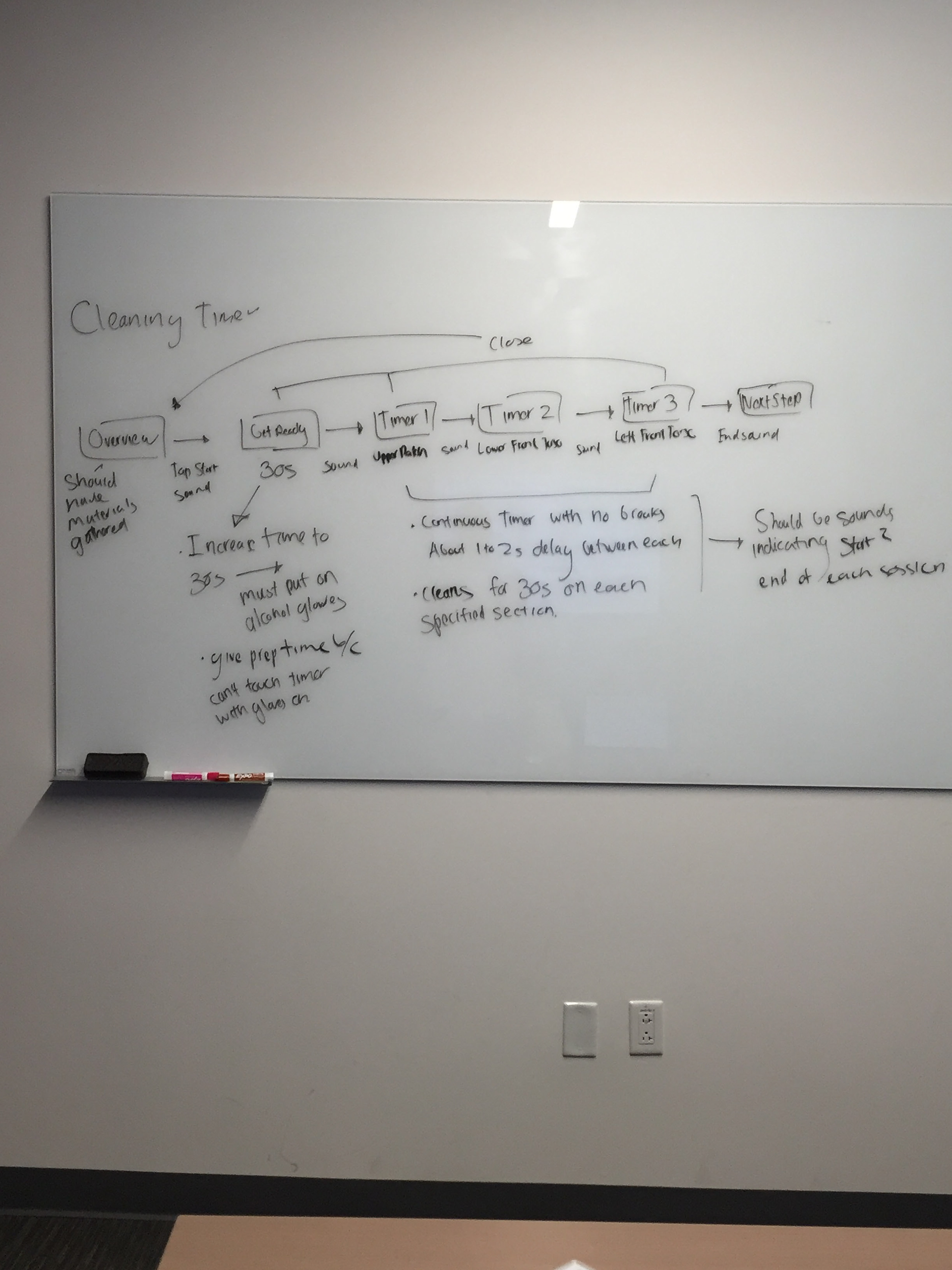

From our white boarding sessions, we were able to refine the timer to adapt to each process that it was going to be used for. For instance, for the skin preparation timer, the user will be given 30 seconds once they’ve tapped start to put on the alcohol gloves. From here, they will complete 3 x 30 second tasks continuously to clean themselves
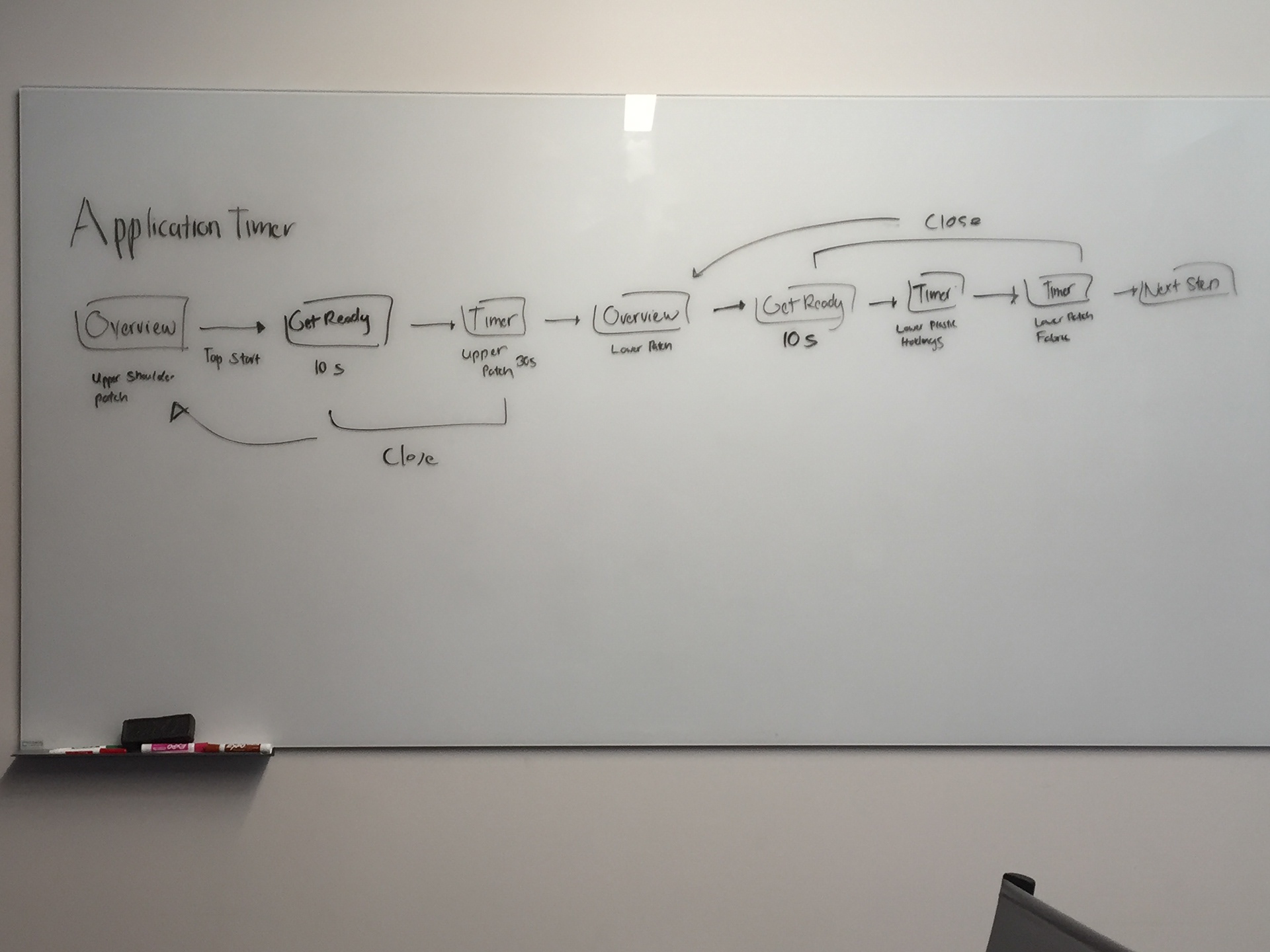

Also from our whiteboarding sessions, we decided to include sounds for starting and ending timer sessions in order to notify the user a timer session is about to begin or end.
Ideation
Using the flows and designs we made during our white boarding session, I created a prototype using Sketch App and Flinto for our next user testing session. This prototype was created in high fidelity using the instructions and images in the current paper manual at the time. We decided to use a high fidelity prototype so the user can accurately simulate each process with the timer.

Skin Preparation Timer

Device Fitting Timer (Blurred for NDA)

Device Application Timer
User Testing Pt. 2
Before the actual user testing sessions, we wanted to test if the buffer time for the skin preparation process was enough time to put on the alcohol gloves. To test this, we set up in house testing with 7 of our fellow co-workers. For our test, we dampened gloves with water to mimic the feel of alcohol and asked our coworkers to put them on while under a 30 second timer. As a result of this test, the quickest time we had was about 18 seconds and the longest time we had was about 44 seconds, while the other times ranged 25- 35 seconds.
With this information, we decided to accommodate the longest time and increase our buffer time to 45 seconds. This is due to the fact that our target crowd will be an older group who might not have the quickest response time.

The goal for this user testing session was to see if users were able to successfully simulate each timer process whether it be skin preparation, device fitting or device application with no issues. Additionally, another goal for this testing session was to gain insight of how to improve the timer process for users and to find out what would better aid them in completing these 30 second tasks.
The success criteria for this testing session was the successful simulation of the each timer process with little to no difficulty.
Results
Users considered the revised timer to be a fairly simple process and they were able to simulate each process with little to no difficulty. Though most of them had a lot of feedback of how to make the process better.
Common suggestions we received from users include:
1. Voice Feature/ Animations /Video
2. Bigger Font and more color.
3. Needs bigger images.
4. Clearer instructions on device application section.
Users simulating the timer process found it very simple to complete because they were already familiar with the process. They considered the timer feature to be of utmost value as it helps simplify processes such as device application and skin preparation.
Although it was simple to follow usability wise, the timer feature has room for improvement. Besides feedback for aesthetics, key suggestions that we received were the implementation of voice overs for instructions as well as animations and videos to help guide users through the 30 second tasks.
Example of one of the timer's used
Final Iteration
The final iteration of the timer design is mostly aesthetic and minimal. It includes larger text and an additional way to close the timer for those who need larger target to tap on.
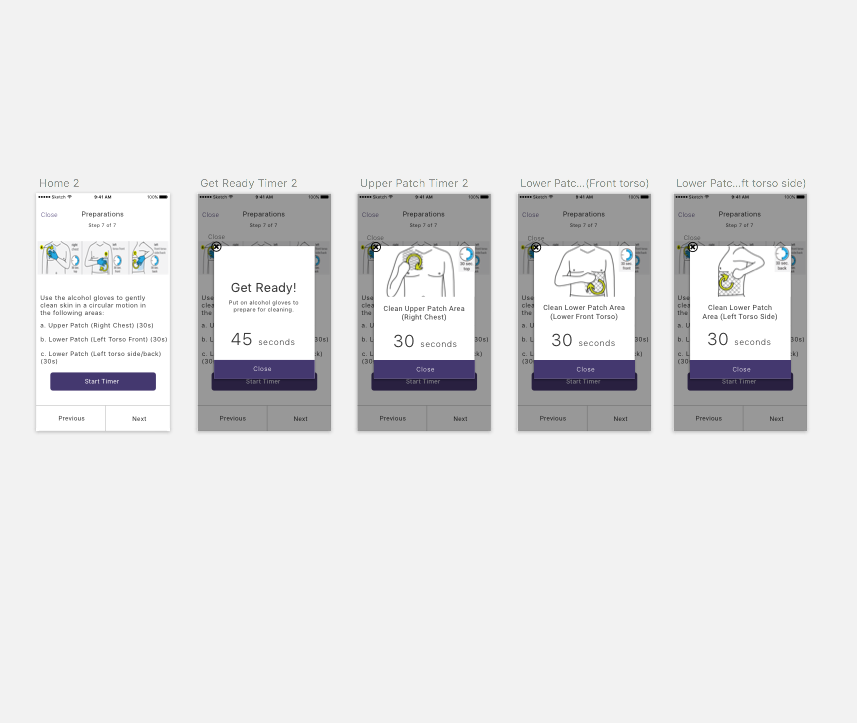
Skin Preparation Timer

Device Fitting Timer (Blurred for NDA)
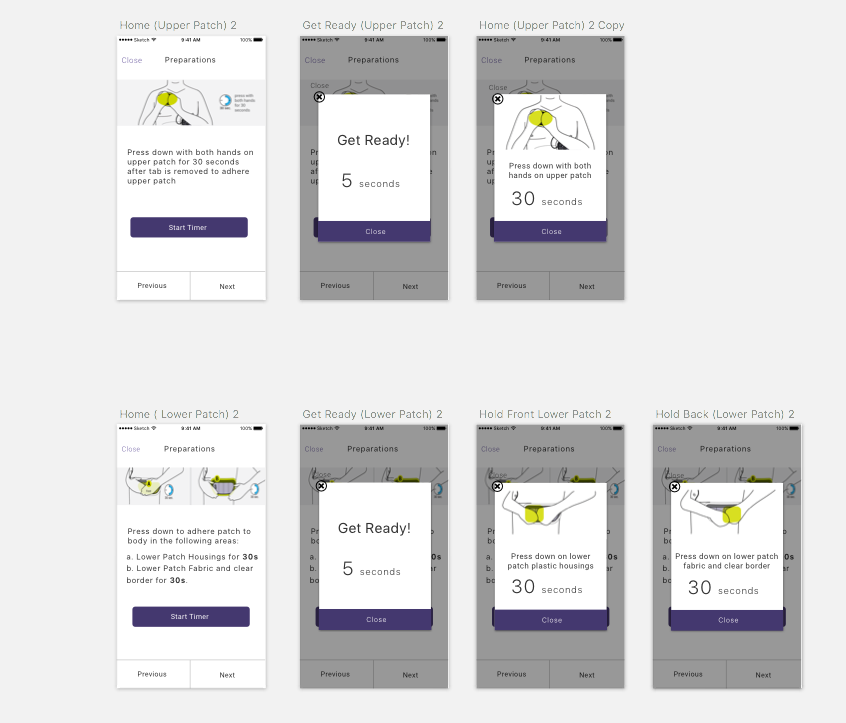
Device Application Timer
Conclusion
Next Steps
The next steps for the timer feature would be working with the Clinical Team to digitize the paper manual and make the images mobile friendly since most of the images used for testing were just resized from the manual. From there, we can work on creating animations, videos and voiceovers as add on’s to the timer process as well as revising the visual design.
Retrospective
This project was the first project as well as the longest project I did at Element Science. It was very surprising to go through scope change immediately after seeing that the first timer didn't match the new instructions. It really showed me things can always change at any minute and as a designer you have to make yourself and your design adaptable.
Lessons Learned
In doing this project, I was able to learn the following lessons:
1. No matter how simple the concept of designing something is, never judge a book by its cover.
2. Expect the unexpected when it comes to developing a design. You should stay adaptable and open to a scope change at anytime.